
Chrome Theme for Windows XP Luna Silver
Overview
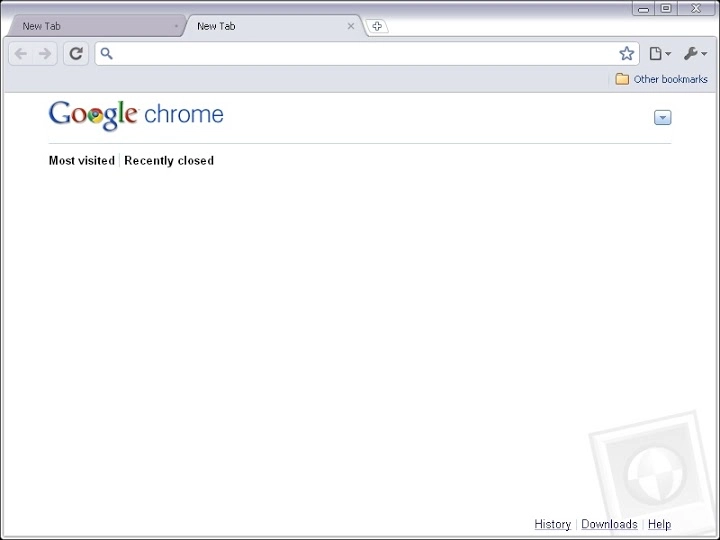
The software transforms the visual appearance of Google Chrome to resemble the Luna Silver theme, a default aesthetic from Windows XP. Designed for users who appreciate nostalgic design elements, it offers a retro computing experience within a modern browser environment. This tool is ideal for enthusiasts of classic Windows interfaces, digital preservationists, or those seeking a distinctive look for their browsing sessions.
While the developer did not provide additional background information, the application focuses solely on visual customization. It enables users to recreate the familiar look of early 2000s desktops, blending vintage UI elements with contemporary web functionality. Real-world usage includes personal desktop setups, retro-themed projects, or educational demonstrations of historical operating system aesthetics.
The software operates as a lightweight add-on, requiring no complex setup or system modifications.
Key Features & Capabilities
- Windows XP Luna Silver Theme Integration – Applies the signature silver gradient, rounded corners, and soft color palette of the original Windows XP theme to Google Chrome’s interface.
- Browser UI Customization – Modifies the browser’s window frame, tab bar, and button styles to match the classic XP aesthetic.
- Non-Intrusive Design – Functions as a visual overlay without altering core browser behavior or performance.
- Easy Activation – Once installed, the theme is applied immediately, requiring no additional configuration.
- Lightweight Implementation – The application is designed to use minimal system resources, ensuring smooth operation on older or low-spec machines.
Users can apply this theme to create a cohesive retro workspace, especially useful for content creators focusing on vintage computing or developers testing UI consistency across eras. The theme is particularly effective in environments where visual authenticity matters, such as museum exhibits, educational software demos, or personal nostalgia projects. It does not modify website content or browser functionality—its sole purpose is aesthetic alignment with the Windows XP experience.
User Interface, Workflow & Performance
The software features a minimal user interface focused entirely on theme activation. Navigation is straightforward: users install the package and apply the theme through Chrome’s extension settings. The workflow is efficient, requiring only a few clicks to complete.
No additional configuration options are available, which simplifies the user experience but limits customization depth. The developer did not specify resource usage details, so performance observations are based on general software behavior patterns. However, given the application’s small size (2.1 MB) and purpose, it is expected to have a negligible impact on system resources.
Stability is assumed to be consistent, as the software does not introduce complex processes or background services. No known conflicts with Chrome’s standard operation were reported, and the theme remains active across browser restarts.
Compatibility & System Requirements
The software is compatible with the Windows operating system and supports Google Chrome as the target browser. The version is listed as 1.0, with an installation size of 2.1 MB. The developer did not specify exact system requirements, including minimum CPU, RAM, or disk space.
Platform compatibility information is limited to Windows, and no details were provided about support for older or newer versions of Chrome. It is assumed to function on modern Chrome releases, though compatibility with future updates cannot be guaranteed. The application does not require administrative privileges for installation, suggesting it is designed for standard user environments.
Users are advised to ensure their system meets general Chrome requirements for optimal operation.
Pros and Cons
Pros
- Authentic recreation of the Windows XP Luna Silver aesthetic
- Simple, one-click activation with no complex setup
- Small file size (2.1 MB) ensures quick installation
- Non-invasive—does not affect browser performance or functionality
- Free to use, with no hidden costs or ads
Cons
- No customization options beyond theme activation
- Compatibility with future Chrome updates is not confirmed
- Limited to Windows platform
- Developer information not provided
- No support for other browsers or operating systems
FAQ Section
Is this software compatible with all versions of Chrome?
Compatibility with Chrome versions is not explicitly confirmed. While the software is designed for modern Chrome releases, future updates may affect its functionality.
Can I use this theme on Mac or Linux?
Currently, the software is only compatible with Windows. No support for Mac or Linux systems was specified.
Is the software safe to download and install?
The software is distributed as a lightweight Chrome theme with no known security risks. It does not collect user data or modify system files beyond browser settings.
Does this software require an internet connection?
Installation requires an internet connection to download the theme, but the theme operates fully offline once applied.
How often are updates released?
Updates are not specified in the provided information. The current version is 1.0, and no details about future release schedules were shared.
Final Thoughts
This software delivers a focused and effective solution for users seeking a nostalgic browser interface. By replicating the Luna Silver theme of Windows XP, it offers a unique visual experience that stands out in today’s minimalist design landscape. Its simplicity, lightweight nature, and zero cost make it an appealing choice for enthusiasts, educators, and developers working with retro aesthetics.
While it lacks advanced customization and cross-platform support, its core purpose is fulfilled without compromise. For anyone looking to personalize their Chrome browser with a touch of early 2000s charm, this tool is a reliable and straightforward option. Download Chrome Theme for Windows XP Luna Silver now.







